Elite

Use your own
custom bot.

Configure the Elite Feed Reader Bot to send feed messages under the identity of your own Telegram bot.

🤖

Custom identity

Your feeds are still managed from the Elite bot, but outgoing posts can be sent by your own bot.

Elite

Configure a custom Telegram bot

You can configure the Elite Feed Reader Bot to use your own customized bot for sending messages.

Warning: custom, vote and like buttons will not work if you use a custom bot.
Step 01

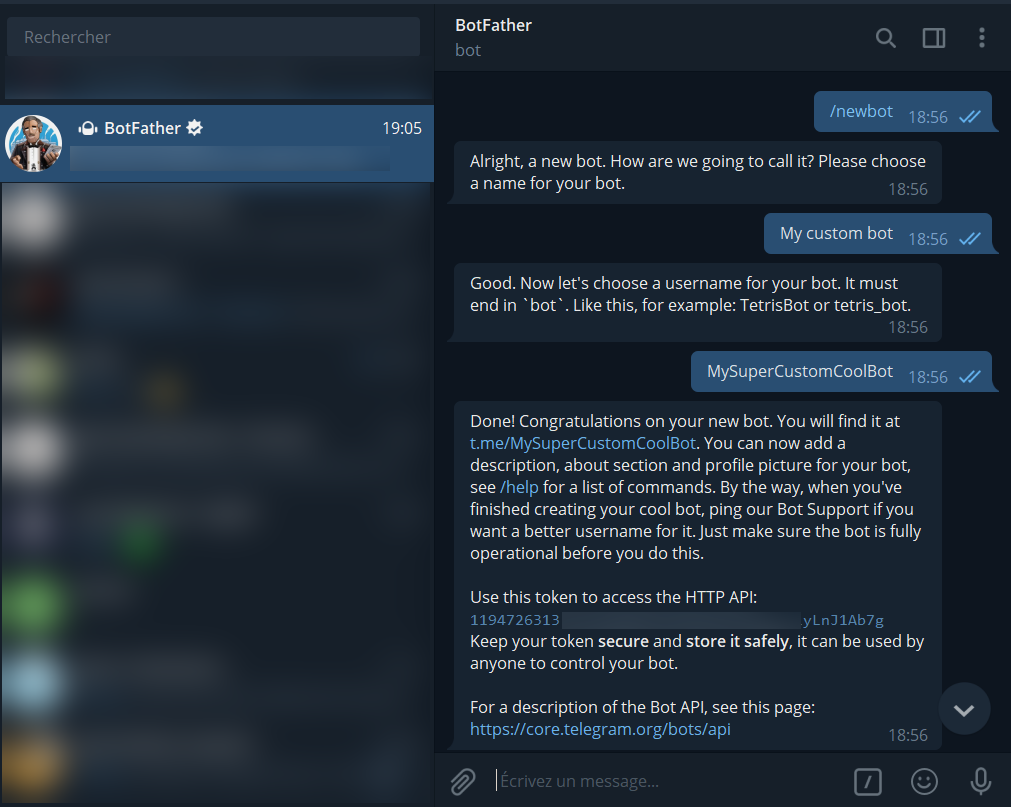
Create a bot with BotFather

First, create a bot using BotFather.

  • Use the /newbot command to create a new bot.
  • BotFather asks for a name and username, then generates an authorization token.
  • The name is displayed in contact details and elsewhere.
  • The username is used in mentions and t.me links. It must be 5-32 characters long, case insensitive, and may only include Latin characters, numbers and underscores.
  • The username must end in bot, for example tetris_bot or TetrisBot.
  • The token is required to authorize the bot and send requests to the Bot API. Keep it secure: anyone with this token can control your bot.
BotFather creates a new bot and provides an authorization token
Example of a bot created with BotFather.
Step 02

Connect the token to the Elite bot

Then tell the Feed Reader Bot to use your custom bot.
In the Elite Feed Reader Bot, use the /botkey command with the token given by BotFather.

Botkey command used with the BotFather token
Use /botkey followed by the token generated by BotFather.
/botkey removeUse this command if you want to remove the connection to your custom bot.
Result

Posts are sent by your custom bot

Once configured, posts from your feeds are sent under the identity of your custom bot.

Feed post sent by a custom Telegram bot
Example of a feed post sent by a custom bot.
Important: you still must type commands in the Elite bot. The custom bot is only used for sending messages.
Groups and channels

Use your custom bot in a group or channel

If you want to use your custom bot in a group or channel, use the /group or /channel command before the /botkey command.

You must configure the Elite bot in your group or channel first, before using a custom bot.

/groupSelect a group context before configuring the custom bot.
/channelSelect a channel context before configuring the custom bot.

Need help?

If you have any trouble, ask for help on the support group.

Open support group